Skip to content

Job Candidate Experience

February 17, 2026

“Bummer news about your application to [Company Name Here]”

How would you feel if you received an email with that subject line?

That’s a real-world rejection email subject line for a job application which asked candidates to submit a 5-minute video demonstrating ideas for improving UX in addition to normal job application questions. (They did include their actual company name in the subject line, we’ve just intentionally left it out to be charitable.)

We asked some friends and family how they would feel and their reactions ranged from a simple “WTF?” to “at least then I’d know and can quickly move on.” The most liked comment from our network was “I picture boys in flip flops and baseball caps running the company.”

Of course rejection is tough. In the context of a job search it’s difficult for the recipient because often there isn’t a direct, clear reason provided. Candidates don’t learn much from generic rejections. And it’s a challenge for companies and recruiters to write those rejection notices too.

Consider This:

Every candidate you interact with will come away from the process with an impression of your team, your values, and your brand. Job applications are a marketing opportunity and communication is critical. Make sure you are representing your brand and company culture in a positive way and be open to feedback when you receive it.

Take some time to craft a thoughtful response and get some feedback from job seekers. It’s not just a nice thing to do, it’s good business sense.

Our Favorite WordPress Plugins: Google Site Kit

September 27, 2022

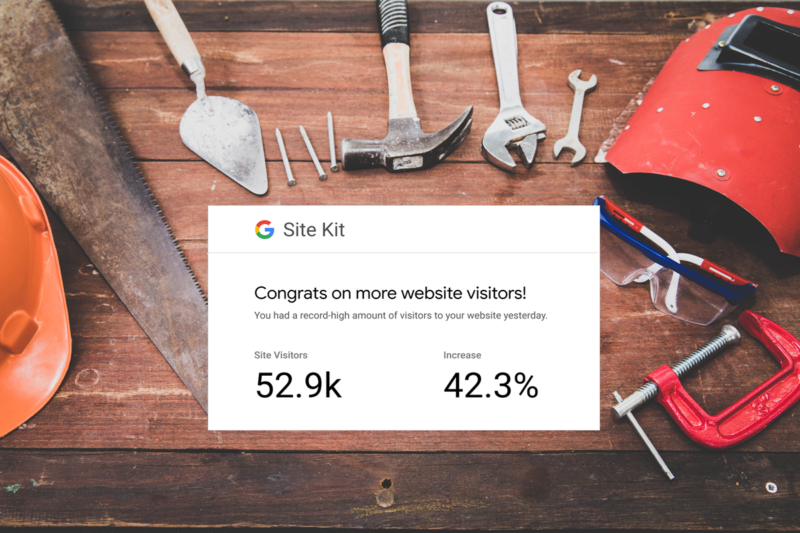
Image showing Site Kit surrounded by construction tools.One of the less fun parts of setting up a WordPress site — especially for clients — used to be connecting all the essential Google tools. Before, developers often had to manually insert tracking snippets into header files, risking breakage during theme updates. Other plugins promised integrations but were either unreliable or scattered data across multiple dashboards.

That’s where Google Site Kit comes in — it’s the official WordPress plugin from Google that brings key performance, search, and analytics tools into a single, centralized dashboard inside your WordPress admin.

Why We Use Google Site Kit on Nearly Every WordPress Project
At Funnychord, we include Site Kit in nearly every WordPress build because it saves time, reduces complexity, and gives site owners meaningful, actionable insights without needing to switch between tools.

Here are six key reasons it’s such a valuable addition:

1. One Dashboard for All Your Key Metrics
Instead of logging into multiple Google products — Search Console, Analytics, PageSpeed Insights, and AdSense — Site Kit brings the most important data right into your WordPress dashboard. That means you can find traffic trends at a glance, search performance including impressions and clicks, and see your monetization insights if you’re using Adsense.

2. Easy to Set Up
One of the biggest headaches when setting up Analytics and Search Console used to be adding tracking code to your theme or editing header files. Site Kit eliminates that by allowing you to connect your Google account from within WordPress and pick only the services you want and use. Then the plugin handles the integration entirely which saves time and reduces the risk of errors.

3. Official, Reliable Data from Google
Because Site Kit is developed by Google, the data it shows is authoritative — the same data you’d see in each individual Google tool. You don’t have to worry about third-party misinterpretation or inaccuracies. And because it displays these metrics in WordPress, you can quickly understand how people find and navigate your site and see what content is performing well.

4. Simplified SEO & Search Insights
Connected to Google Search Console, Site Kit helps you answer questions like:

  • What keywords are bringing people here?
  • Which pages have the most impressions?
  • Are there issues with indexing or search visibility?

Getting this information directly in WordPress makes SEO monitoring simpler and less intimidating — especially for site owners unfamiliar with the individual Google tools.

5. Performance & Speed Awareness
Site Kit also integrates with Google PageSpeed Insights, showing you performance scores and optimization suggestions you can act on to improve user experience — a factor that matters for both search ranking and engagement.

6. Monetization Tracking
If you’re running ads through Google AdSense, Site Kit can connect you directly and show revenue metrics without requiring a separate plugin. While not every site will need this, it’s a nice bonus for blogs or sites that monetize.


Who Google Site Kit Is Great For
Whether you’re a developer handling multiple builds, a small business managing your own site, or an agency reporting to clients, Site Kit makes essential data accessible and actionable — right where you manage your content.

Why We Consider It Essential
We treat Google Site Kit as part of our default install on every new WordPress project because:

  • It’s official and reliable
  • It reduces the need for multiple plugins
  • It surfaces useful insights without extra dashboards
  • It’s free and maintained by Google

It’s not a replacement for deep analytics platforms, but for most site owners and developers, it’s the best first place to get a snapshot of traffic, search performance, and site health.

Google Site Kit isn’t just another plugin — it’s a way to make better decisions based on real data, all without leaving your WordPress dashboard. If you’re building sites that matter, it’s one of the simplest ways to unlock useful insights quickly and responsibly. And no…we have not been paid for this post!

The Funnychord Design Philosophy

September 10, 2022

The Funnychord Design Philosophy has grown-up over time, but has always included a few important standards:

1. Content Rules

You can make anything beautiful, but does it make sense for the message?

Content means that your message drives the design, not the other way around. A good example of this is when you find something another company is doing and just replace the names and words with your own. It will look good, but your customers will see right through it.

Tailored suit and unique button2. Trust

Good design is pretty. Excellent design is honest.

Trust in design feels just like trust in other people. Flashy colors and graphics are perfect for some products, but maybe not for yours. What makes design excellent is if it feels honest and tailored just for that company. It’s like a tailored piece of clothing – it’s meant for you even though it uses elements (fabrics, buttons, stitching) that other clothes have too. And just like with a tailored piece of clothing, it carries your personality too.

3. Function

If it’s annoying to use, they won’t be using it for long.

Function goes beyond just creating buttons linking to your product page. You can also read debate after debate about how “orange is the best color for a button” or “the button has to be at the top of the page!” At this point, most people have heard the spoilers: It isn’t…and…they don’t. Here’s what to do instead: Focus on what the page is saying (content), what the message reveals about the product or company (trust), and how the user can solve their problem (function).

Our three standards wrap into a general philosophy: be yourself. We operate that way, we treat our clients as our friends, and we put this feeling into our designs. And you know what? It may not work for everyone. If we aren’t a good fit for our clients, we have the honesty to let them know and maybe help them find a different team. That’s reality.

The first consideration we make when starting a new project is if the client is looking for beautiful nonsense, or gorgeous reality. The beautiful nonsense clients typically want a quick, cheap fix to make their product “pretty,” but aren’t willing to put in the time to get to the core design and customer issues.

Gorgeous reality is true to the product, to the client’s mission, and to their customer’s delight. If you’re looking for solutions like that, we would love to get to know the real you.

Trademark Bandits

January 8, 2018

Natasha: “What do you think?”
Boris: “I think he is as dumb as a sack of hammers.”
Who handles your trademark registrations? If you’re a sole proprietor, start-up, or small business, you might be personally responsible. The paperwork process to satisfy the federal government is hard enough without what I like to call “Trademark Bandits” making it more difficult.

I recently received two official-looking pieces of mail addressed to me, with all my trademark registration information pre-filled on a very official-looking form. They were reminding me of my upcoming trademark renewal deadline. “How nice of the government to send a reminder!” you might think. WRONG!

These are solicitations from Trademark Bandits. The form titles are things like, “United States Trademark Maintenance Service” and “Patent&Trademark Bureau.” If you’re not one for reading the fine print, you might complete the form, write your check, and send off what you think is the renewal for your trademark. What you’re actually doing if you send them money is signing up for a listing or reminder service that has nothing to do with the government-required renewal of your trademark.

The fine print on these two solicitations I received say, “Patent&Trademark Bureau is a private business that is not endorsed by the U.S. government” and “This service has not been approved or endorsed by the Federal Government & this offer is not being made by an agency of the Federal Government.” This is how they avoid legal responsibility or can claim that you “knew what you were signing up for.”

Important to read that fine print, huh? The amounts they are asking for aren’t small either: $619 and $925 for these two. See an example below of how one of these bandit mailings might look.

Example of a fraudulent/misleading solicitation.

Think you’ve been tricked by a Trademark Bandit?

If you sent them money, unfortunately the USPTO can’t directly help get your money back. They aren’t an enforcement agency and can’t stop these companies from sending these solicitations. However, you can contact your state consumer protection authorities. The United States Patent and Trademark Office maintains a list of misleading companies and even shows examples of the mailings so you can confirm your suspicion.

Watch this USPTO video about fraudulent solicitations. It’s pretty boring (and maybe funny depending on your sense of humor), but it might be helpful.

This is the most helpful information from the USPTO related to Trademark Bandits. I hope you’ll share this with your network so we can help each other learn how to spot them.

Note: Similar tactics are used by other private companies regarding domain names. If you receive a notice in the mail of renewing your domain name, BE SKEPTICAL! If you need help determining if these solicitations are real, Funnychord can help you. Contact us for a helping hand in catching these bandits.

What I’ve learned from WooCommerce

December 1, 2017

When evaluating ecommerce platforms, the hardest decision often isn’t design or pricing, it’s choosing the system that will quietly power every transaction behind the scenes. Anyone who has already been through the experience knows that the most difficult step can be right at the beginning: determining which ecommerce platform to use.

Because we’ve been through this at Funnychord, I hope to offer some perspective and advice not only on the specifics of WooCommerce, but the general decision process.

WooCommerce is powerful because it’s extensible. But that power requires discipline. The difference between a store that “works” and one that reliably drives revenue comes down to how deeply you think about the full commerce lifecycle.

Here are a few lessons I’ve learned along the way.

NASA image of Buzz Aldrin on the moon for the Apollo 11 mission

1. Design for the Whole Journey – Not Just One Small Step

It’s tempting to focus on the visible moment of purchase — the product page, the checkout form, the confirmation screen and all the pretty interactions. But if your objective is to land on the moon, you wouldn’t start by determining what color your suit should be. It’s important to take a step back and consider all of the important steps that will lead you there.

Ecommerce product thinking goes further. For subscription businesses especially, the majority of revenue depends not on the first transaction but on everything that follows. I’ve implemented renewal retries for clients to recover tens of thousands of dollars in revenue that would have otherwise disappeared. Most merchants never see that churn, they just feel it.

The most successful WooCommerce implementations I’ve worked on weren’t the ones with the flashiest front-end design — they were the ones that anticipated lifecycle complexity.

2. Map the Entire Payment Lifecycle

Before launching any store, I’ve learned to map the complete transaction flow — from authorization through fulfillment and post-purchase support. This includes initial authorization and capture, tokenization for saved payment methods, webhook handling and asynchronous confirmation states, subscription renewals and retry logic, refund and dispute workflows, merchant visibility into transaction states, and much more.
Hand sketch of a payment process outlined in the example

Gather your team (even if that’s just you) and outline what the purchase process looks like from the perspective of your customer. Practice describing a sale and make note of every touchpoint that involves you, your team, or your website. Importantly, make sure you note all the questions that come up during the process.

My silly happy path example:

  1. Don visits my Cool Aquarium Plant Website (how did he get there?)
  2. Don adds two plants to his shop cart (Should the cart be saved if he goes away? Should I put a “hold” on his order for those unique plants?)
  3. Don pays for his order (What kinds of payment methods will I offer?)
  4. Don’s order is submitted and he should receive a confirmation (Should he receive an email receipt too?)
  5. My team receives the order (What will that look like? Can it be added to our internal software?)
  6. My team packages Don’s order and ships it out (Will they have to add tracking information? How will Don know it’s on the way?)
  7. Don receives his plants and is clearly a happy customer (He is happy…right? How will I know?)

There are a ton of questions that will help you think through several paths. The path above is the “happy path.” So if you’re only planning for one path, you’ll miss a bunch of other not-so-happy failures. Those can happen at the boundaries between systems — during webhook timing issues, expired tokens, or mismatched status updates between external providers.

3. Merchant Experience Matters as Much as Shopper Experience

Animated astronaut tripping on the moon

WooCommerce’s strength is that it empowers merchants. But empowerment requires clarity. When implementing stores, I’ve consistently seen that merchants value clear reporting dashboards, clarity and guidance when failures inevitably occur, and confidence in the system’s stability. If merchants don’t trust their payment system, everything else suffers.

Automation is a fantastic way to reduce the burdens of management, but it doesn’t mean the system can run without maintenance. Think of it just like the exercise above: each failure is an opportunity to plan for better handling in the future.

4. Extensibility Is Both a Gift and a Responsibility

WooCommerce’s ecosystem allows for deep customization. That’s one of its greatest advantages, especially compared to closed commerce systems. But extensibility also introduces complexity and can lead to plugin conflicts, third-party integration risks, site performance issues, and user data privacy concerns.

Successful implementations require thoughtful curation, clear prioritization, and restraint. The goal isn’t to

install everything possible, it’s to build a stable, scalable foundation that supports business goals without unnecessary fragility.

5. Trust Is the Product

Over time, I’ve come to believe that payments are fundamentally about trust. Customers must trust that they are being charged correctly, that their information is secure, and that errors are handled fairly. Merchants need to have trust that revenue is accurately recorded, failures are visible and recoverable, and that the system won’t silently erode their subscription base.

Every UX decision — from checkout copy to billing emails — influences that trust.

6. The Open Web Still Matters

One of the reasons I’ve continued working with WordPress and WooCommerce over the years is their alignment with open commerce. Open systems allow merchants to own their data, customize their experience, and grow without being locked into rigid constraints. That flexibility can be challenging, but it creates opportunity for thoughtful product work that supports businesses at every scale and allows them to grow on their own terms. WooCommerce can represent the difference between participation and exclusion in the digital economy.

After nearly 10 years, here’s what I’d emphasize even more today.

Looking back at my early WooCommerce work, I focused heavily on UX flows and conversion optimization. Those are important — but today I’d place even more emphasis on:

  • Payment reliability metrics
  • Renewal success rates
  • Failure recovery systems
  • Instrumentation and monitoring
  • Reducing merchant support burden

The most meaningful product improvements often aren’t flashy. They’re small changes that reduce friction, improve observability, or clarify billing expectations — and those changes can have outsized impact on merchant revenue and customer trust.

WooCommerce taught me that ecommerce is not a feature — it’s a system. It sits at the intersection of user experience, technical reliability, compliance, partnerships, and business outcomes. Building responsibly in that ecosystem requires empathy for merchants, respect for complexity, and a commitment to continuous improvement.

That’s what keeps me interested in WooCommerce years later.


Since originally publishing this article, I’ve had the opportunity to work on complex ecommerce and subscription platforms, including managing payment integrations, subscription lifecycles, and merchant experience at scale. These experiences have deepened my understanding of how small improvements in reliability, billing clarity, and lifecycle design can create meaningful impact for both merchants and customers. Revisiting these lessons now, I see even more clearly how critical trust and operational resilience are in building successful ecommerce systems.